


Tile Travels
4.951.00 Reviews
App Specs
- Version
- 1.576.0
- Updated On
- License
- Free
- Downloads
- 10,000+
- Developer
- PlaySimple Games
- Categories
- Puzzle
- Platform
- Android
Screenshots
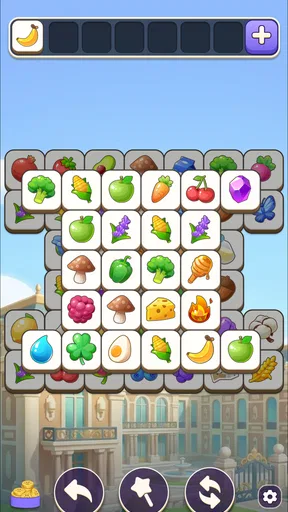
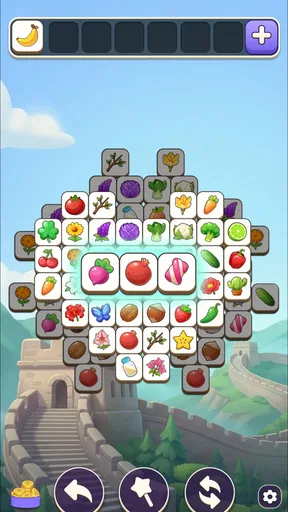
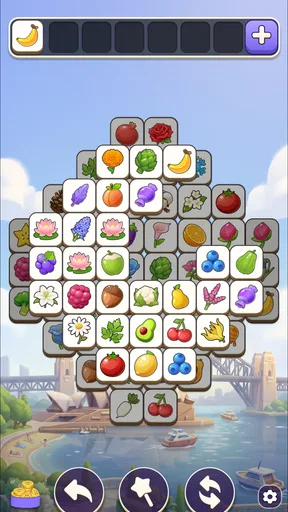
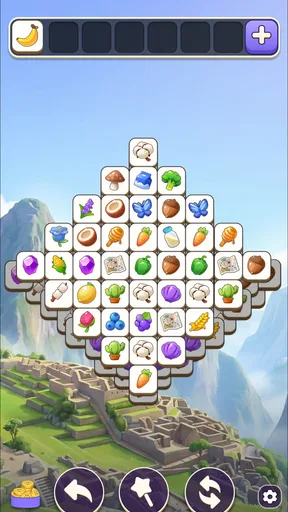

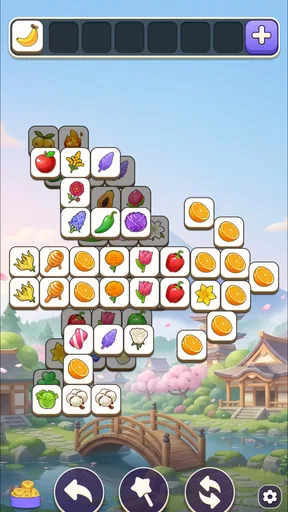
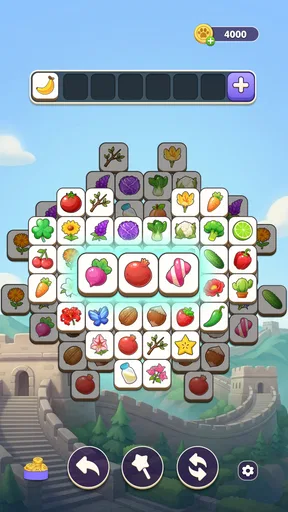
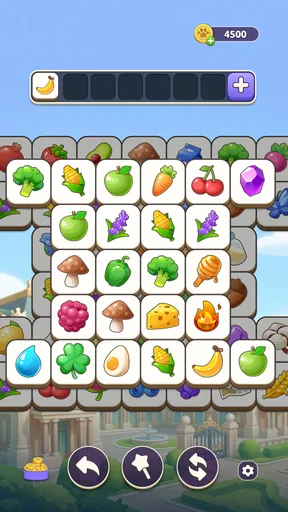
 Analysis by AppCompare
I started Tile Travels expecting a simple matching game, but its appeal became clearer after a few short sessions. The basic action is easy to understand: look across a board of tiles, find matching pieces, and clear them in the right combinations. What makes the experience work is the steady chain that follows each move. I tap, see the board change, collect progress, and then get a fresh reason to solve another arrangement. It is a gentle puzzle game rather than a demanding test of speed, and that makes it especially comfortable for small breaks.
As a free puzzle game from PlaySimple Games, it is aimed at people who like familiar tile-matching rules with a travel-flavored sense of progression. The age rating is Everyone, so the presentation is approachable for a broad audience. I also found the controls immediately readable on a phone: there is no complicated movement system to learn, and the main challenge comes from choosing what to match before the available options become awkward.
How the first move sets up the whole experience
I like that the opening move teaches the game’s rhythm through a clear action and an immediate board response, while leaving room to learn when a match helps the next turn. As you settle in, the useful question becomes not just what can be cleared, but what that choice will reveal. That small shift from tapping at sight to planning one move ahead is where the puzzle starts to feel purposeful.
A simple action with more planning than it first suggests
The opening move is deliberately uncomplicated. I scan the board, identify a pair or group that can be matched, and tap it. The satisfaction comes from the immediate visual response rather than from a long explanation. Tiles disappear or shift, the remaining layout becomes easier to read, and I can begin considering the next choice. That short distance between action and result is important because it lets me understand the puzzle through play instead of through instructions.
At first, I was tempted to match the most obvious tiles as quickly as possible. That works for learning the rhythm, but it is not always the best habit. A more useful approach is to look at what a match will expose. Clearing a visible pair may reveal a better combination underneath, while taking an easy match too early can leave the board with fewer useful options. This is one of the first practical lessons the game teaches without saying it directly: the best move is often the one that improves the next two moves, not merely the one that scores immediately.
That small layer of planning separates it from a purely automatic matching toy. I do not need deep strategy, but I do need to pay attention. When I am tired, I can play casually and accept a less efficient solution. When I want a little more involvement, I can pause before each tap and examine the consequences. The same board therefore supports two moods: relaxed clearing and careful puzzle solving.
Why the travel setting matters
The world-travel framing gives the individual boards a sense of direction. Instead of feeling like an endless stack of unrelated puzzles, the game presents progress as a journey. I found that useful psychologically because it gives each completed challenge a place in a larger sequence. Even when the matching itself remains familiar, the idea of moving onward makes the next board feel like a continuation rather than a reset to zero.
Worth Reading Before You Choose

EA SPORTS FC Mobile 26 Is a Bigger Football Game, but It Takes Time

Flipboard Shows What News Apps Must Do Beyond the Feed

Switching to Android Auto Means Rethinking Your Driving Routine

Google Calendar Makes a Crowded Week Easier to Manage

Ludo King Makes the Most of the Minutes Between Plans

Baby Panda World Brings Quick Play to Modern Phones, but Its Game Library Feels Busy
This presentation will appeal most to players who enjoy light progression around their puzzles. If you only want a pure board with no surrounding journey, the travel layer may feel decorative. I personally liked having that context, especially during longer sessions, because it gave me a reason to continue after solving a board that was enjoyable but not especially memorable on its own.
The first useful habit: protect future options
My most useful early adjustment was to stop treating every match as equally valuable. Before tapping, I try to check whether the move opens space, connects another possible pair, or removes a tile that is blocking several others. This is not a complex technique, but it changes the feel of the game. I spend less time reacting and more time shaping the board.
For a quick session, I would not overthink this. The game is at its best when the planning remains light. If I turn every board into a serious optimization exercise, I lose the calm quality that makes it suitable for casual play. The right balance is to look one step ahead, then let the board’s response guide me.
The feedback rhythm keeps the loop moving
Every successful match supplies a small piece of feedback: the selected tiles respond, the layout changes, and the puzzle becomes closer to completion. That sequence gives the game a dependable rhythm. I act, receive confirmation, reassess the board, and act again. There is little waiting between those stages, which is why a single spare minute can turn into a complete mini-session.
The rhythm is also forgiving. A mistake does not make the entire game feel ruined in the way a failed attempt can in a timed or highly competitive puzzle. I can usually recover by slowing down and examining the remaining arrangement. This makes the game less stressful than match-three titles that constantly push speed, chains, or high scores. The emphasis here is on reading the board and maintaining flow.
That does not mean every moment is equally smooth. When several similar tiles are close together, I sometimes need to spend extra time checking which pieces actually belong together. On a smaller phone screen, visual scanning can become the main source of friction, particularly when I am playing quickly. The game rewards patience more than frantic tapping, so I would not recommend it to someone looking for rapid arcade pressure.
How to use the feedback instead of tapping on autopilot
I get better results when I treat each board change as information. After a match, I do not immediately choose the next obvious pair. I first check the newly exposed area and look for blocked pieces that have become available. This simple pause prevents a common mistake: clearing a visible match while overlooking the more valuable opening created by the previous move.
Another helpful habit is to reserve a promising combination when the board allows it. If one pair is easy to identify but another move could expose several more tiles, I usually take the opening move first. The game does not require advanced memorization, yet remembering one or two useful locations can make a difficult arrangement feel much more manageable.
These choices create the feedback loop that keeps me engaged. A good move is not only satisfying because it clears tiles; it also improves the information available for the next decision. That is the central pleasure of the design for me.
Reward without turning every session into a contest
Tile Travels uses completion and onward progress as its main sense of reward. Finishing a puzzle feels like closing a small task, while the travel structure gives that task a place in the broader journey. I appreciate this because the reward is connected to solving rather than requiring me to compete with other players or chase an elaborate score system.
The result is a calmer motivation. I often begin with the intention of solving one board, then continue because the next arrangement looks approachable. The game creates momentum through unfinished progress: once I have made several successful matches, stopping immediately feels less natural than seeing the current puzzle through.
That same design may be less satisfying for players who need a strong competitive target. If your favorite puzzle games revolve around leaderboards, strict timers, or increasingly technical combos, this is a softer alternative. Its reward is the feeling of completion and discovery, not the pressure of proving that you are faster than someone else.
Managing the free-to-play side of the experience
The game is free to download and play, but it includes in-app purchases ranging from $1.99 to $49.99 per item. That is worth keeping in mind before settling into a long-term routine. I would approach the game as a free casual experience first, rather than assuming that every optional purchase is necessary for enjoyment.
My practical advice is to decide in advance whether you want a no-spending puzzle habit. If the answer is yes, treat the purchase prompts as part of the surrounding free-to-play structure and keep your attention on the board itself. If you are comfortable spending occasionally, set a personal limit before a frustrating or particularly absorbing session makes the decision for you. The matching loop remains the reason to play; spending should not become the reason a session feels successful.
This is also where the game differs from a paid puzzle app. A one-time purchase usually offers a cleaner relationship between the player and the content, while a free game such as this one lowers the barrier to trying it but may ask for more patience around optional monetization. For me, that trade-off is acceptable for short, relaxed play, though players who dislike purchase prompts may prefer a premium alternative.
The reward works best when the goal is modest
I enjoy the progression more when I set a small target: complete one puzzle during a break, make a few careful moves before bed, or continue only until the current board is finished. Those limits keep the reward feeling fresh. If I play for too long simply because another puzzle is available, the individual completions begin to blur together.
This makes the game a good companion for routine moments. I can use it while waiting for an appointment, during a quiet commute when it is safe to do so, or after finishing a more demanding task. It is not a substitute for a deep strategy game, but it fills the space between “I want something to do” and “I want to commit my full attention.”
Why the reset feels inviting rather than punishing
Once a board is complete, the game gives me a natural stopping point. The puzzle is finished, the immediate objective is clear, and the next challenge can wait. That reset is one of the strongest parts of the experience because it makes short sessions feel complete instead of interrupted. I can put the phone down without feeling that I abandoned a complicated run.
At the same time, the completed board creates a gentle invitation to continue. The journey is still moving, and another arrangement is ready when I return. This balance between closure and continuation is carefully suited to casual play. I am rewarded for stopping, but I am also given a reason to begin again.
For an everyday example, imagine having ten quiet minutes before leaving home. I can open the game, solve a board at my own pace, and stop at a clean transition. If I choose a more competitive puzzle instead, I might feel pushed to protect a streak or finish a timed round. Here, the reset is less demanding. That is valuable when I want entertainment without adding another obligation to my day.
When the reset may not be enough
The same gentleness can feel repetitive if I am looking for a dramatic change from one session to the next. The central activity remains tile matching, so players who need constant mechanical variety may lose interest. The travel framing adds context, but it does not transform the fundamental action into a different genre.
I would also skip it if my priority is a completely uninterrupted experience with no free-to-play considerations. A paid, offline-focused puzzle may be a better fit for someone who wants a self-contained product and is willing to pay upfront. Tile Travels makes more sense for the player who values easy access, light progression, and the ability to play in brief bursts.
Who will get the most from the loop
I would recommend it to people who enjoy matching puzzles but do not want every round to feel like a performance test. It suits players who like scanning, planning a move or two ahead, and receiving quick visual confirmation after each decision. It is also a good choice for families looking for an approachable puzzle category with an Everyone age rating, provided that adults keep an eye on the in-app purchase side when younger players use the device.
It is less suitable for someone who wants a highly competitive challenge, a story-driven adventure, or a puzzle system that changes radically from board to board. Those players may find the loop too measured. The game’s strength is consistency, and consistency can become predictability if your taste runs toward surprise or complexity.
Device and version details worth checking
The current version is 1.576.0, and the game requires Android 8.0 or later. That makes the compatibility question straightforward for many Android users: check the operating system before installing, especially on an older phone or tablet. I would also leave enough screen space for comfortable tile inspection, since the main challenge depends on distinguishing and comparing pieces rather than on complicated controls.
The game has a 5.0 average from around 1.8 thousand ratings, with over 10 thousand installs and 48 written reviews. Those figures suggest a small but very positive audience so far. I would treat that as encouraging rather than conclusive: the rating indicates strong satisfaction among current players, while the relatively modest reach means it has not yet established the broad track record of the biggest puzzle names.
My verdict on action, feedback, reward, and reset
The loop is easy to describe but pleasant to experience. I choose a match, watch the board respond, use the new layout to plan another move, and finish with a clear sense of progress. The reward is modest, yet it arrives often enough to make another session tempting. When I stop, the completed puzzle gives me closure; when I return, the journey gives me a reason to begin again.
The best reason to try Tile Travels is its low-pressure rhythm. It does not demand that I memorize complicated rules or maintain perfect concentration. Instead, it turns a familiar matching action into a sequence of small decisions with immediate feedback. The main trade-off is that the experience may feel too repetitive for players who want intense competition or constant novelty, and the in-app purchase range deserves sensible boundaries.
For my own use, I would keep it as a break-time puzzle rather than a game I play for hours without pause. That is not a weakness in this case; it is the role the design handles well. If you want a friendly tile game with a travel-shaped progression, accessible controls, and a reset that makes short sessions feel complete, Tile Travels is an easy recommendation. If you want a premium, pressure-free puzzle with no free-to-play friction, choose a different kind of alternative instead.
Pros
- Relaxing tile-matching gameplay suitable for short sessions.
- Travel-themed levels provide a pleasant visual change of scenery.
- Simple controls make it accessible for casual players.
- Progression offers a clear sense of achievement.
- Playable offline in many situations
- useful while traveling.
Cons
- Some levels can feel repetitive after extended play.
- Later puzzles may rely heavily on boosters or extra moves.
- Ads may interrupt gameplay between levels.
- Limited lives can slow progress when you make mistakes.
- The game may require considerable storage on older devices.
FAQs for Tile Travels
What is Tile Travels and how does the game work?
Tile Travels is a casual puzzle adventure game built around matching tiles and completing level-based challenges. During play, you usually clear groups or combinations of identical tiles to progress through different destinations and themed stages. The early levels are easy to understand, but later puzzles introduce more complicated layouts, limited moves, obstacles, and objectives that require planning rather than simply tapping the fastest matches.
Is Tile Travels free to download and play?
Tile Travels can generally be downloaded for free on supported Android or iOS devices, allowing you to begin playing without an upfront purchase. However, the game may include optional in-app purchases for extra lives, boosters, coins, or other helpful items. Progress can normally be made without spending money, although waiting for lives or facing difficult levels may encourage purchases. Check the store listing for the current pricing and availability in your region.
Does Tile Travels require an internet connection?
An internet connection may be needed for certain parts of Tile Travels, including advertisements, cloud saving, events, account synchronization, and in-app purchases. Some previously loaded levels may remain playable offline, but this should not be assumed for every feature or update. If you plan to play while traveling, open the game before going offline and test whether your current progress and available levels continue to work without a connection.
Are there advertisements or in-app purchases in Tile Travels?
Tile Travels may display advertisements, particularly between levels or when you choose to receive a reward such as additional moves, lives, or boosters. Optional purchases can also provide virtual currency and useful power-ups. The exact frequency of ads and available packs can change with updates, device settings, and region. Before downloading, review the official store description and your device’s purchase controls, especially if children may use the app.
Is Tile Travels suitable for children and what device does it need?
Tile Travels is generally easy to learn and suitable for players who enjoy relaxed matching puzzles, but parents should still check the age rating and store information for their country. Advertisements, optional purchases, and online features can affect the experience for younger users. Performance depends on the device, operating-system version, and available storage, so confirm the current Android or iOS requirements before installing it on an older phone or tablet.


